
Mental Model
Foldnano designs are far easier to edit once you separate three concerns: placement (where helices sit in space), routing (how DNA threads through them), and identity (which oligo is the scaffold). The whole data model is a hierarchy built around those ideas.
Document
Named browser working copy plus editor state.
- Saved in IndexedDB
- Exportable as .fn.json
Part
The mutation owner for the DNA model.
- Owns regions
- Owns oligos
- Receives commands
Design Regions
Lattice or freeform work areas attached to planes.
- Honeycomb
- Square
- Freeform
Virtual Helices
Addressable helices that carry strand sets.
- Placed by region
- Frame from plane
- Stable id
Oligos
Connected DNA paths made of ordered segments.
- Explicit scaffold flag
- Color/name/sequence
- 5 prime to 3 prime
Segments And Ends
Editable spans and connection points.
- Move ends
- Break segments
- Connect 3 prime to 5 prime
Export fallback: a Foldnano document contains a part; the part owns design regions and oligos; regions place virtual helices on planes; virtual helices carry strand sets; oligos are connected DNA paths; segments and ends are the editable pieces of those paths.
The rest of this page walks the hierarchy from the outside in. You don't need to memorize it, but knowing which level an edit happens at explains a lot of the editor's behavior: why undo groups the way it does, why reordering rows never breaks crossovers, why scaffold must be marked explicitly.
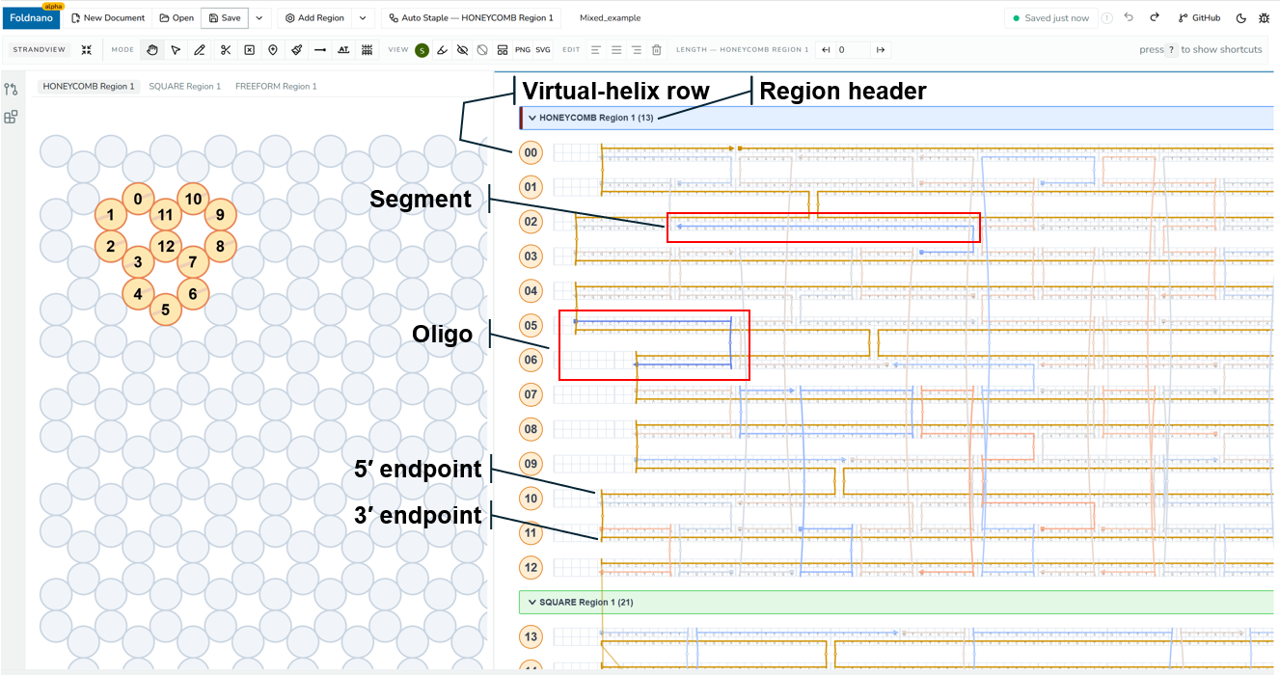
Editor with overlaid labels pointing at the region header, a virtual-helix row, an oligo, a segment, and a 3′/5′ end.
Document
A document is the saved working copy shown in the editor. It holds the current part data plus the metadata the browser and GitHub workflows use to find the design again (name, IDs, sync state). When you "save," this is what gets written to IndexedDB; when you export .fn.json, this is what is serialized.
Part
The part is the mutation owner inside the DNA model. Every topology edit, virtual-helix edit, sequence edit, color edit, and annotation edit flows through commands that mutate the part. That single ownership rule is what makes undo/redo and autosave coherent: there is exactly one place state changes, so history can record and replay it.
For you as a user this mostly shows up indirectly. Almost every edit is undoable (Ctrl/Cmd + Z), and the document stays internally consistent even across complex multi-region edits.
Planes And Design Regions
A plane is a coordinate frame used to place virtual helices. A design region is a workspace attached to a plane. It owns a set of virtual helices and the rules for how they may be positioned and connected.
| Region type | Placement model | Typical use |
|---|---|---|
| Honeycomb lattice | Snapped lattice coordinates (parity rules) | cadnano-style honeycomb origami |
| Square lattice | Snapped lattice coordinates (parity rules) | cadnano-style square origami |
| Freeform | Explicit local helix frames (arbitrary position/angle) | custom geometry and non-lattice designs |
A part can contain multiple regions of different types, for example a lattice bundle with a freeform extension. Each region has its own plane and its own placement rules, and each gets its own grouped block of rows in the strand viewer. Region-specific tools (lattice grid, constrained crossover sites, lattice auto-staple) are gated on the active region, not on the part as a whole, so what's available depends on which region you're working in.
Virtual Helices
A virtual helix is the addressable helix row used for routing. In lattice regions it is positioned by lattice row and column; in freeform regions it is positioned by an explicit local frame.
Helix identity is stable
A virtual helix's display row can change when you collapse a region or reorder helices, but its identity (and every crossover attached to it) does not. Reason about a design by helix identity, not screen position. This is why reordering rows in the strand viewer never breaks your routing.
Oligos, Segments, And Ends
An oligo is one continuous DNA strand, ordered 5′ → 3′. It can contain one or more segments joined by crossovers. Each segment occupies a run of base positions on a single virtual helix.
Ends are the editable termini of segments:
- Connecting a 3′ end to a 5′ end creates a crossover or connection (always directional: upstream 3′ → downstream 5′).
- Breaking a segment introduces a nick and creates two new ends.
- Moving an end changes the segment's span.
Most strand-view editing is, under the hood, manipulation of segments and ends, which is why Selection is end-based.
Explicit Scaffold
This is the most important difference from classic cadnano. Foldnano does not infer scaffold identity from scaf / stap arrays. Scaffold is an explicit oligo label you set intentionally.
To mark an oligo as scaffold, right-click it in the strand viewer and choose Set as Scaffold. The same menu shows Set as Staple on a scaffold oligo to undo the label.
Why this matters in practice:
- It enables mixed and non-cadnano workflows where "the scaffold" isn't tied to a lattice slot convention.
- It means scaffold-specific features (the scaffold sequence indicator, scaffold highlighting, and some exports) only behave as expected after you've marked the scaffold.
Warning
Before you rely on any scaffold-aware indicator or export, make sure the intended oligo is actually flagged as scaffold. cadnano scaf/stap arrays are treated purely as a file-format direction convention on import/export; they are not the same thing as Foldnano's scaffold label.
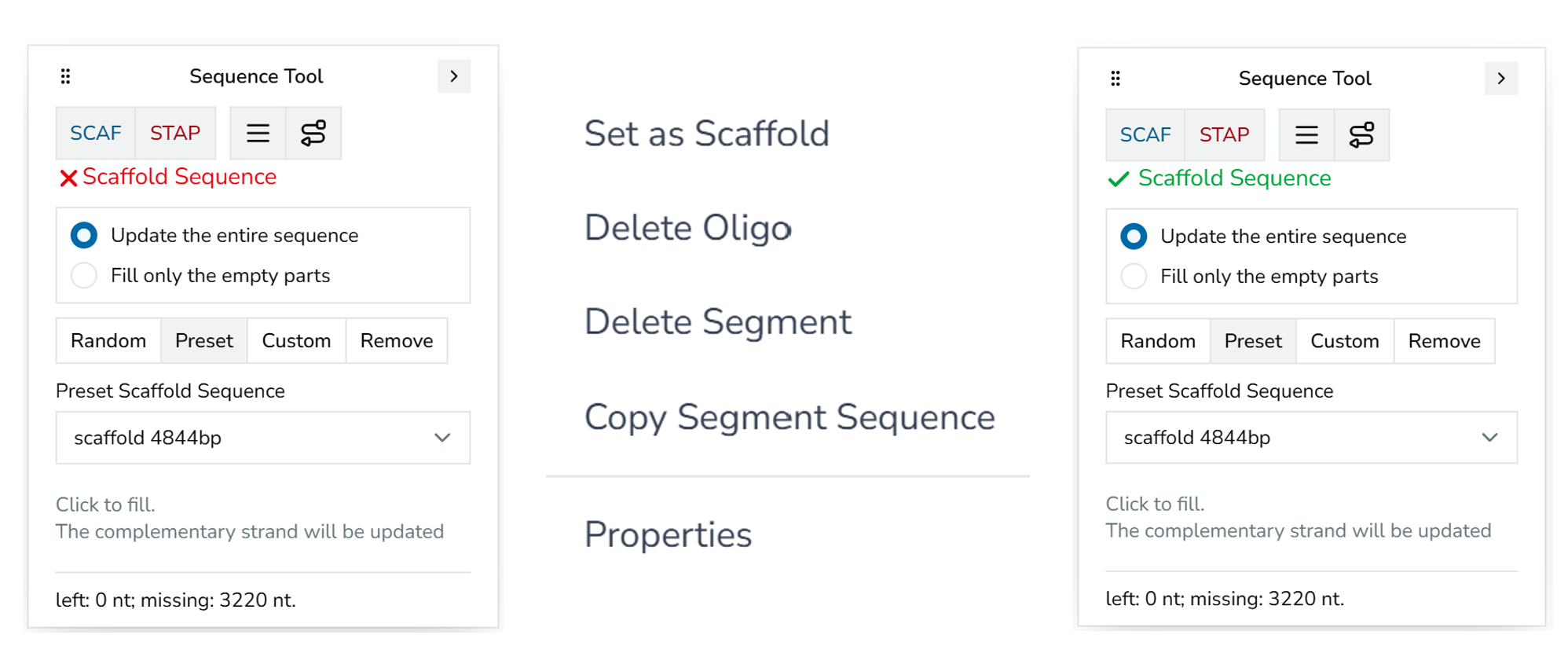
The 'Set as Scaffold' context menu item, alongside the Scaffold Sequence indicator in its stale (red) and healthy (green) states.