
Oligo Report And Diff
The oligo report is a full-page table of every oligo in a design: its name, where it starts and ends, its sequence, length, color, and end modifications. It's the place to review staples before ordering them, and the Oligo Diff page compares the reports of two saved designs.
Opening The Report
- From the editor: Save menu (the ⌄ next to Save) → View Oligos. The current design is saved to browser storage first, then its report opens.
- From the Oligos page (
/oligos), which lists every document saved in this browser: click View Oligos on a document. Open goes back to the editor instead. - From Saved Documents (
/toc): View Oligos on a document card.
Note
The report covers the first part of a document, and only real oligos: mirror copies are left out, as they are in every export.
The Report Page
The header shows the document name and ID, with three buttons:
| Button | Action |
|---|---|
| All Oligos | Back to the Oligos list |
| Open Editor | Open this design in the editor |
| Download CSV | Download the same CSV as the editor's Export Oligos of this Part as CSV |
The table has one row per oligo, with the text tinted in the oligo's own color. Click any column header to sort by it; click again to reverse.
| Column | Contents |
|---|---|
| OligoKey | A short ID derived from the oligo's positions (oligo-…). The same routing gives the same key in any document. |
| Name | The oligo's optional name, empty if it has none (see below) |
| Start / End | 5′ and 3′ end, written helix[base], for example 12[48]. Circular oligos show Circular. |
| Sequence | Assigned sequence, 5′ → 3′ (empty for circular oligos) |
| Length | Length in nucleotides |
| Color | The oligo's color swatch and hex value |
| Mod5Prime / Mod3Prime | Terminal modification names, if any |
| Positions | Every segment as 5′ end>3′ end, in routing order |
Note
Oligo names are optional labels. Set them in the editor's Select tool panel or from a plugin. They're there for your convenience and for the ordering sheet; Foldnano never uses them to identify an oligo. They don't have to be unique, and most oligos have none. The CSV's first column is Name, left empty for unnamed oligos. The OligoKey is the stable, position-based identifier.
Circular oligos are listed but the page warns that they're rejected by CSV export. Linearize them in the editor first (the circular strand highlight finds them, see Selection).
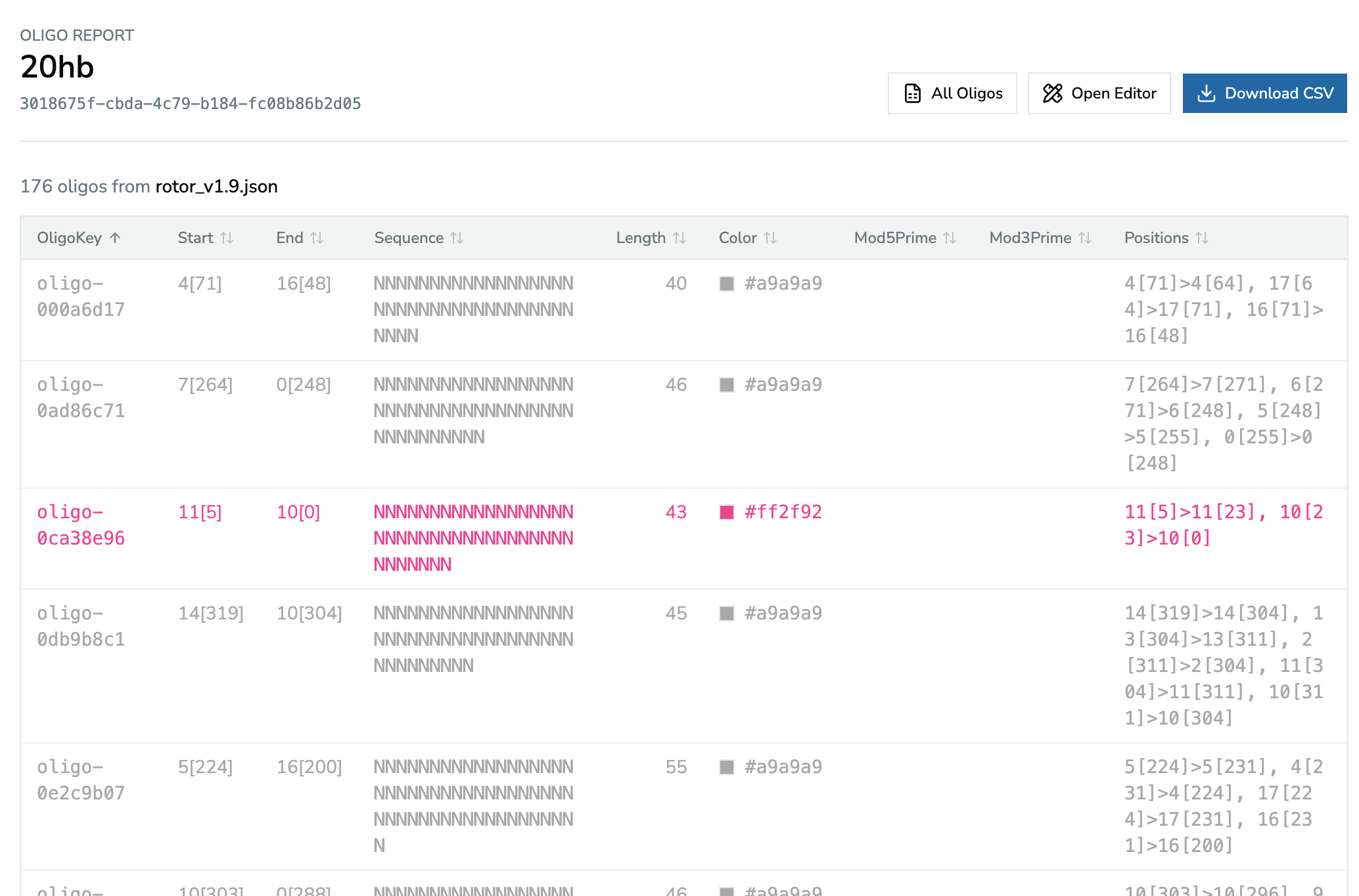
The oligo report, sorted by OligoKey. Each row is tinted in its oligo's color.
Comparing Two Designs
The Oligos page has a Compare saved documents section:
- Pick a Left and a Right document (they must differ).
- Click Compare. The Oligo Diff page opens (
/oligos/diff).
The diff matches oligos by their positions (the same segments on the same helices), then compares the remaining columns. The summary shows how many oligos are:
| Status | Meaning |
|---|---|
| Unchanged | Same positions and identical values |
| Changed | Same positions, but a different name, sequence, color, or modification |
| Only in left | Present only in the left design (for example removed or re-routed) |
| Only in right | Present only in the right design (for example added or re-routed) |
Below the summary, a table lists every oligo that isn't unchanged, with its Status, the Changed fields, and the Left values / Right values side by side. If everything matches it says No oligo report differences.
Each side also has a Download CSV button for that document's report, and you can change either document and click Compare again at the top of the page.
Tip
When you keep two versions of a design in this browser (for example before and after re-running Auto Staple or a plugin), compare them to see exactly which staples changed before you re-order anything.