
Simulation And Export
Once a design is routed and sequenced, Foldnano can relax it for a quick geometry preview and export it for downstream simulation, fabrication, or archival. This page covers the rigid-body preview, the nucleotide model that feeds every simulation export, and each export path.
Rigid-Body Simulation (RBS)
Rigid-body simulation is a render-time relaxation preview in the 3D view. It moves rigid blocks of the structure to relieve strain so you can sanity-check geometry before committing to a heavier off-tool simulation. The approach is inspired by the rigid-body cluster simulation in oxView.
Typical flow:
- Switch the left pane to 3D.
- Click Relax in the RBS group.
- Toggle relaxed positions to view the relaxed geometry.
- Enable stress coloring to spot strained connections (for example crossovers pulled out of place).
While it runs, the button reads Stop and an RBS running chip appears. Clear relaxed layout discards the result.
Params opens the solver settings: Spring k (connection stiffness), Repulsion C (how strongly blocks push apart), Friction, Steps, and Collisions (collision passes per step). After a run, the 3D View Inspector panel shows Simulation Diagnostics: block and constraint counts, RMS constraint error, and maximum overlap (the same block count and RMS error appear as a toolbar chip).
To see which parts of the design move as one rigid block, toggle Show RBS blocks in the strand-view toolbar.
Warning
RBS results are transient. They are not saved in the .fn.json and are a render-time override only. If you change topology afterward, the relaxed state becomes stale: a Relaxed layout stale chip appears and the button changes to Re-relax. Re-run it before reading anything into the relaxed geometry.
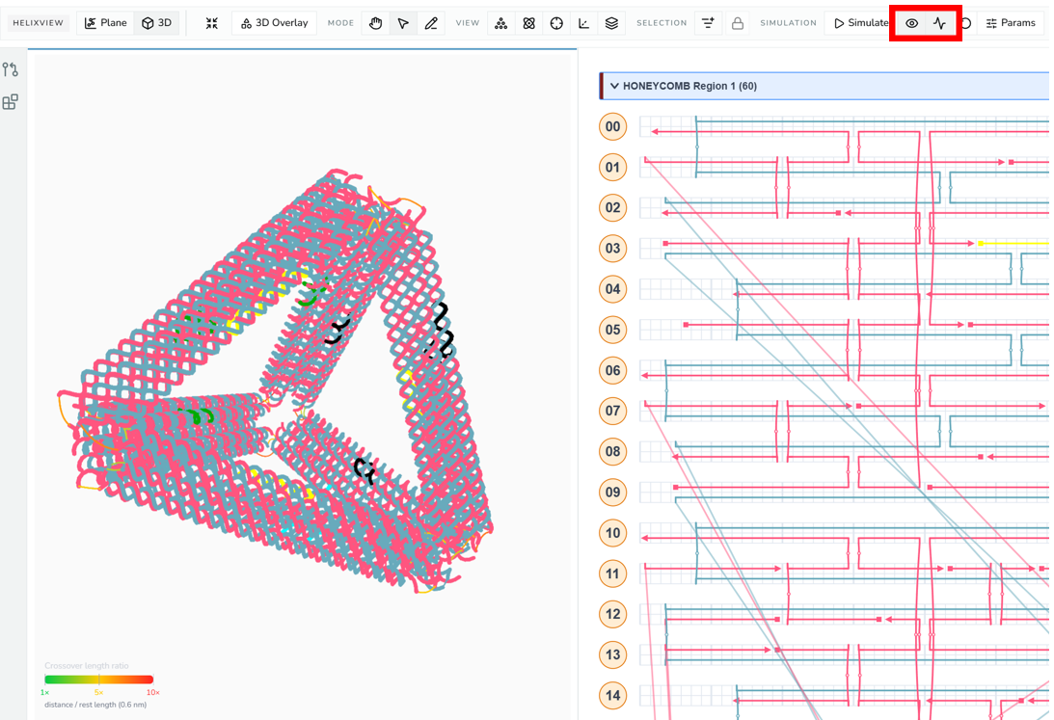
3D view after Relax, with stress coloring on and the relaxed-positions / stress toggles highlighted.
NT Model
Every simulation export is built from a format-agnostic nucleotide (NT) model derived from the current design. The NT model expands virtual-helix slots into nucleotide records, connections, strand order, and geometry, a single intermediate that both oxDNA and mrDNA exporters consume.
Skips and inserts are resolved here, before file export:
- a skip removes that base position from the emitted nucleotide path,
- an insertion adds extra nucleotide positions between neighboring slots,
- sequence assignment follows each oligo's current 5′ → 3′ order.
The NT model, and so every simulation export and the 3D view's NT mode, can't be built when a skip or insert:
- differs between the two strands of one base,
- sits on a base where only one strand exists (for example after you deleted the opposite staple), or
- sits on a constrained crossover site.
The export stops with a message naming the helix and base (the 3D view shows Cannot show NT model and falls back to strand rendering). Remove the skip or insert there, or restore the missing strand, and export again.
Single-stranded DNA itself is fine: oxDNA and mrDNA simulate it. Don't add single-stranded bases as an insert on one strand, though. Make them explicit in the design instead: draw them as ordinary strand bases (or shorten the strand rather than skipping a base on it), or remove the skip or insert before simulating.
Warning
Because skips and inserts change the emitted path, they also shift where assigned bases land. Check the scaffold sequence indicator and re-run relevant checks before exporting any simulation file (see Editing Tools).
oxDNA Export
oxDNA export produces the topology + configuration file pair for oxDNA-style simulation. It uses the current 3D geometry, or relaxed positions when relaxed display is enabled, so a relax pass before export gives oxDNA a less-strained starting configuration.
If the design has no assigned sequence at all, oxDNA export first opens a No Sequence Data dialog. Unassigned double-stranded positions are filled with random complementary bases; you choose the base for single-stranded positions (T, the usual oxDNA placeholder, or A, C, G, Random) and click Export.
Before exporting to oxDNA, confirm:
- the scaffold sequence is not stale,
- skips/inserts are intentional,
- cross-region connections look correct in 3D,
- any desired RBS relax pass has been re-run.
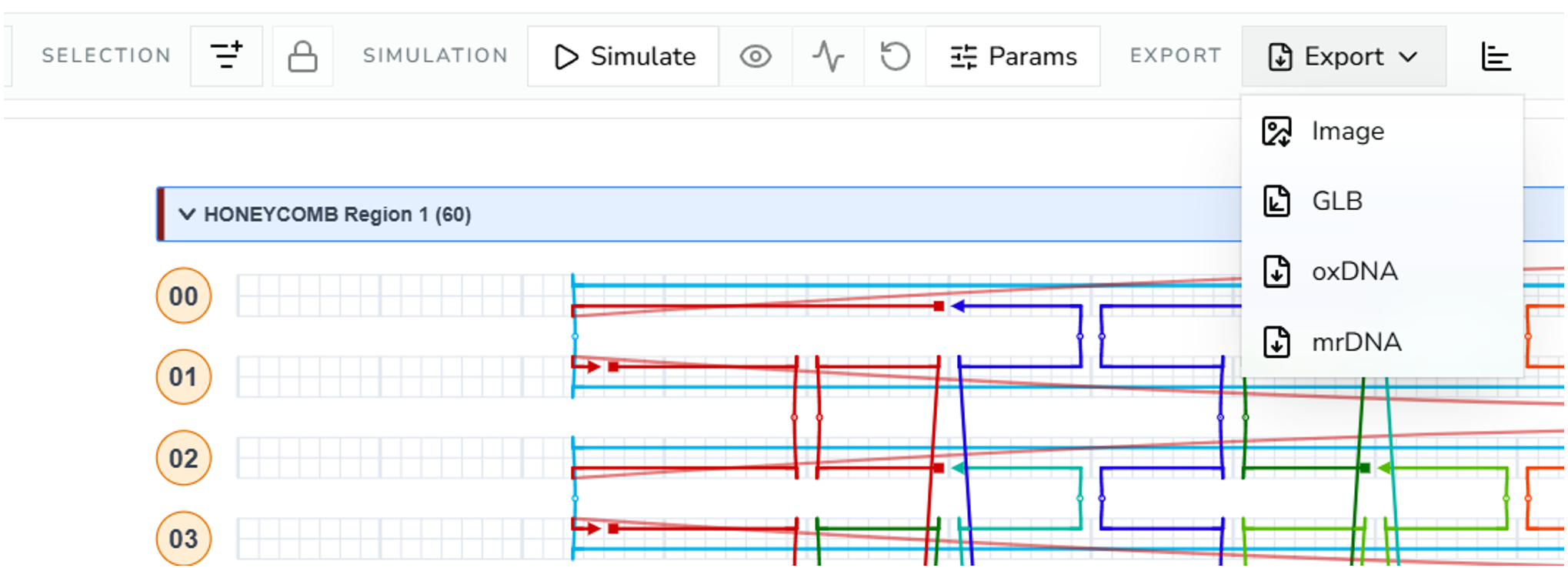
3D toolbar Export menu open, showing Image, GLB, oxDNA, and mrDNA options.
Mirror copies
If the design contains linked mirror copies, check Include mirror copies in the Export menu to include them in oxDNA and mrDNA output, for example to simulate the assembled repeat structure. They're left out otherwise.
mrDNA Export
mrDNA export uses the same NT model but emits mrDNA-targeted files. Use it when your downstream workflow expects mrDNA input instead of oxDNA. The same pre-export checks apply.
Other Export Paths
| Export | Format | Where | Notes |
|---|---|---|---|
| Foldnano design | .fn.json | Save menu | Full native backup and GitHub sync format. |
| cadnano design | .cadnano.json | Save menu | Lattice-compatible topology; lossy for freeform geometry, scaffold labels, and other Foldnano metadata. Only valid for cadnano-compatible lattice regions. |
| sequence CSV | .csv | Save menu | Oligo/sequence report for the part (Export Oligos of this Part as CSV; also downloadable from the Oligo Report page). Requires explicit 5′/3′ ends, so linearize any circular scaffold/staple oligos first (the "circular strand" highlight finds them). |
| strand view | .svg / .png | Strand-view toolbar (SVG, PNG) | 2D routing snapshot; the SVG includes sequences. |
| circular scaffold map | .svg | Circular Scaffold Map panel | Scaffold map with staple arcs and histograms. |
| plane view | .png | Plane-view toolbar (Export as image) | Lattice or freeform placement snapshot. |
| 3D snapshot | .png | 3D toolbar | Rendered 3D image. |
| GLB | .glb | 3D toolbar | 3D geometry export for external 3D tools. |
Tip
Prefer .fn.json whenever the goal is to preserve the design. It's the only format that round-trips everything. See Saving And GitHub for backup strategy.
Exporting cadnano JSON
Before Export as cadnano JSON downloads anything, Foldnano checks what cadnano can't hold and lists it in a dialog:
- Must be fixed first (no download): a freeform region, a connection that joins a cadnano scaffold path to a staple path (cadnano keeps them in separate arrays, so the file couldn't be read back), or helix lengths cadnano can't open.
- Will be lost or changed (Export anyway downloads): connections to other regions are cut, repeat-group copies are left out, and a design whose helix length fits both lattices (such as 672 bases) makes cadnano ask whether it is square when you open the file. The message tells you what to answer.
- Not included: sequences, modifications, oligo names and the scaffold label.
If there is nothing to fix or lose, the file downloads right away. The Design Checks Reference lists every case. Plugins that work on cadnano JSON run the same check before they start.
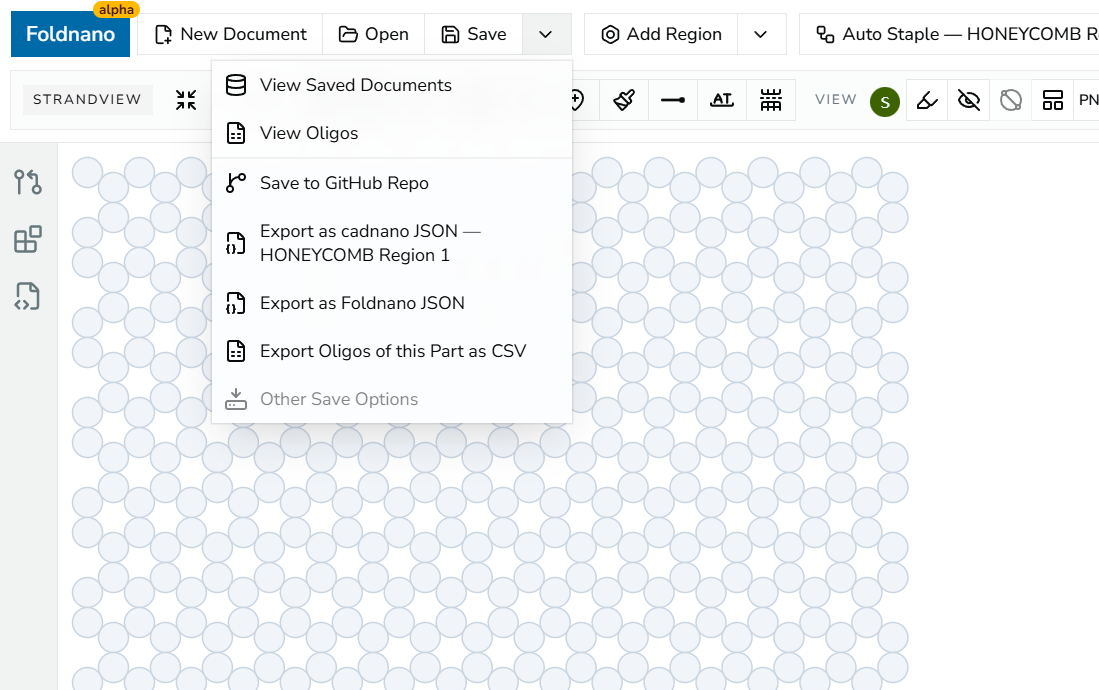
Save/export dropdown in the top toolbar, showing the Export as cadnano JSON, Export as Foldnano JSON, and Export Oligos of this Part as CSV items.